Redesigning Issue Management for Clarity, Speed & Team Workflows
Overview
The Issue Management module in juno.one is the backbone of the entire platform, connecting tasks, time tracking, documentation, and planning.
The original experience suffered from legacy UI patterns, poor information architecture, and inefficient workflows. As the product grew, these issues significantly impacted usability and team productivity.
I led the end-to-end redesign of the module, focusing on simplifying workflows, improving visibility, and making the system adaptable for different team needs.
Client
juno.one
Timeline
2023
Tools used
Figma
ChatGPT
Miro
Jitter
Illustrator
Problem
The existing module was built on legacy tables with excessive columns, requiring horizontal scrolling and creating high cognitive load.
Filtering and searching issues was slow and required multiple steps, making it difficult for users to find relevant work. Users also didn’t see their assigned tasks by default, forcing repetitive manual filtering.
Creating issues was unintuitive. Users often entered only a title and had to open a separate view to complete details. This resulted in incomplete issues accumulating in the backlog and requiring time-consuming manual cleanup.
From a system perspective, performance was affected by inefficient data handling, further degrading the user experience.
Overall, the module lacked clear structure, intuitive workflows, and scalability.
My role
I was responsible for redesigning the issue management module end-to-end.
My responsibilities included:
• Redefining information architecture and core workflows
• Designing new interaction patterns and UI components using the design system
• Improving filtering, search, and issue creation flows
• Introducing new features to support team workflows and flexibility
• Collaborating with developers within legacy system constraints
The goal was to create a system that is fast, intuitive, and adaptable for different types of users and teams.
Actions
The redesign focused on three key areas.
1. Simplifying Structure & Reducing Cognitive Load
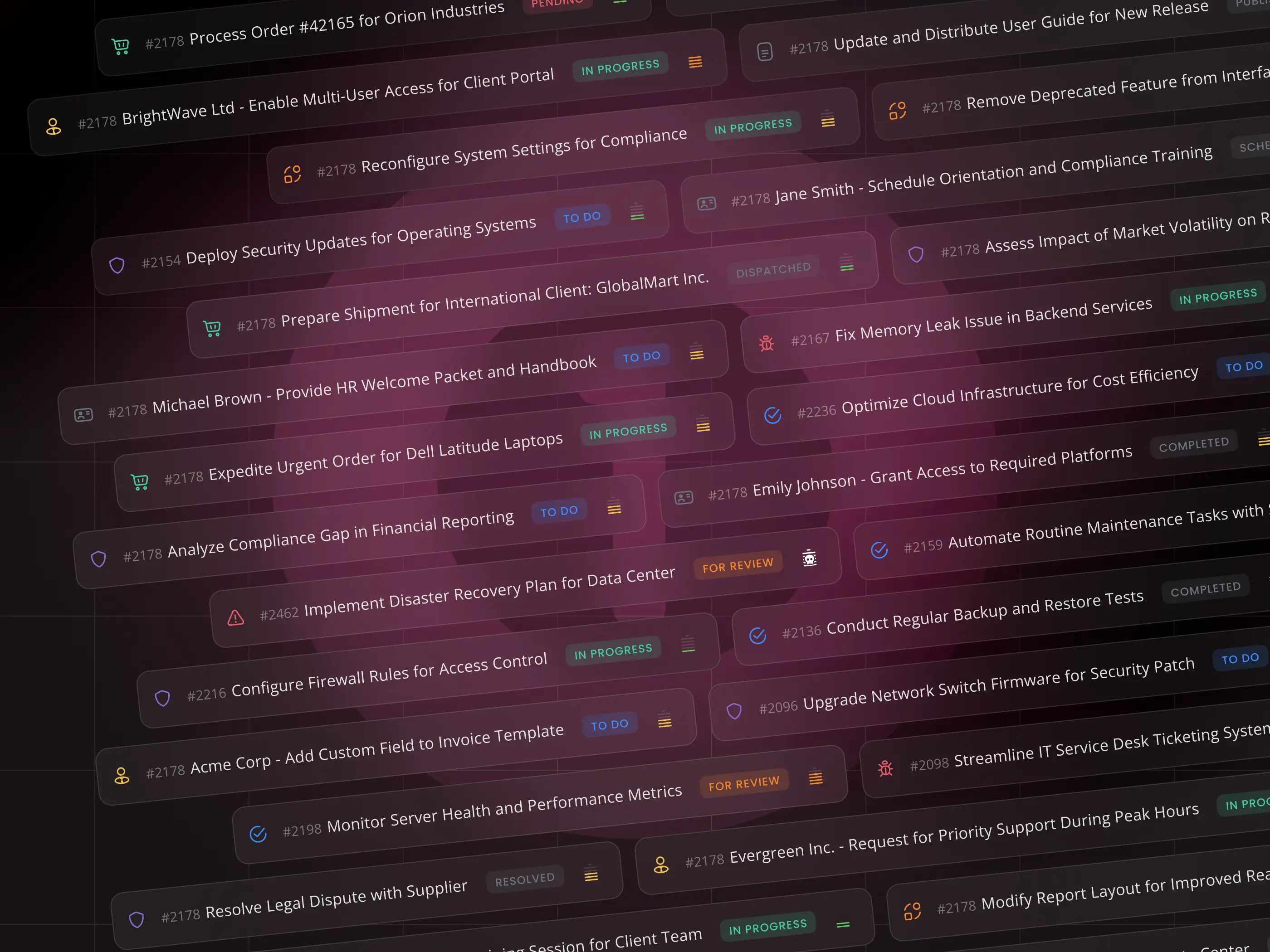
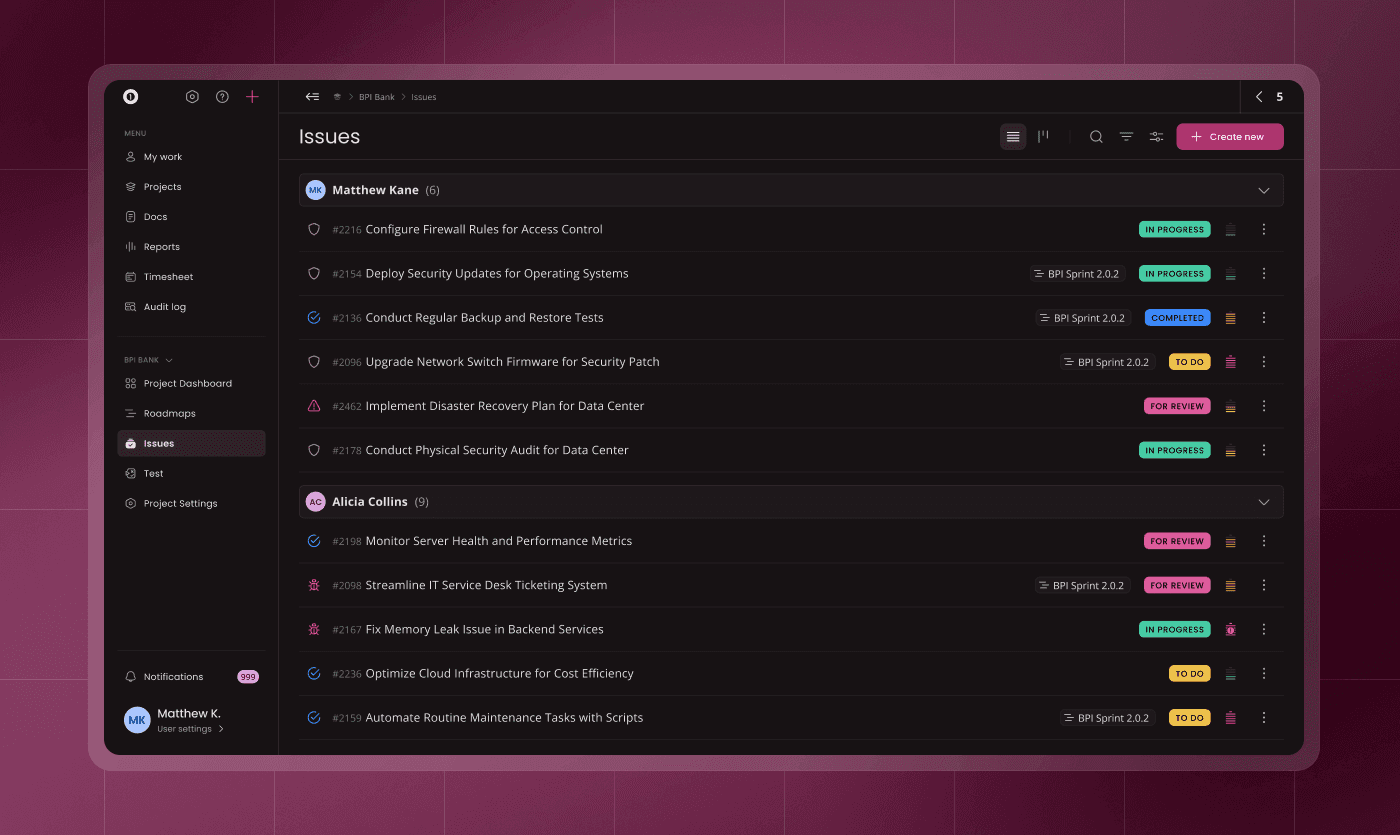
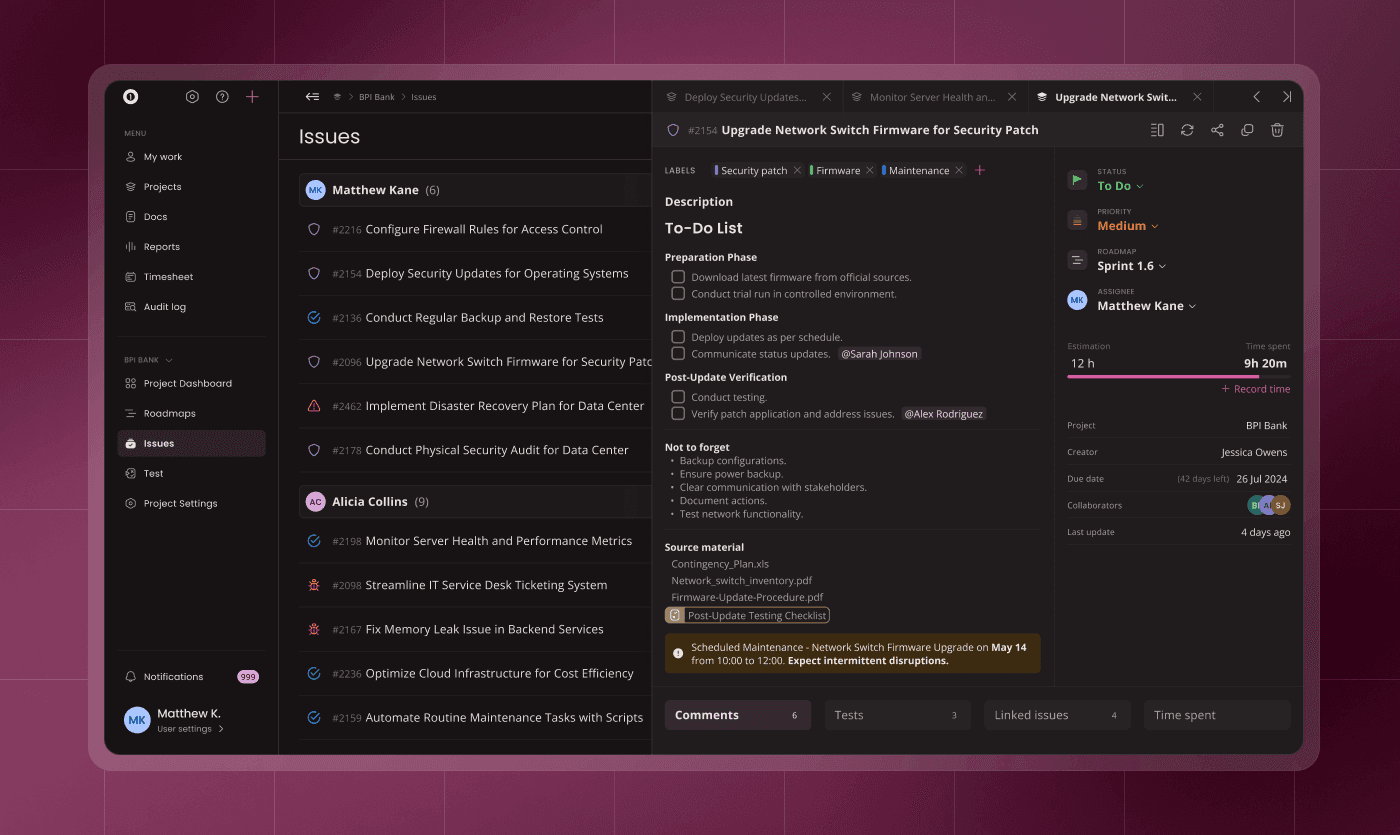
I replaced legacy tables with a structured list-based layout designed for fast scanning and clarity.
The new layout highlights key information while reducing visual noise. Users can also customize visible elements and group issues by properties such as status, assignee, or priority.
This made the interface significantly more readable and adaptable to different workflows.
2. Reworking Core Workflows
I redesigned critical flows to remove friction and improve usability:
• Streamlined issue creation with all key inputs in one flow
• Improved commenting and collaboration with functional mentions and notifications
• Introduced issue linking (parent–child relationships)
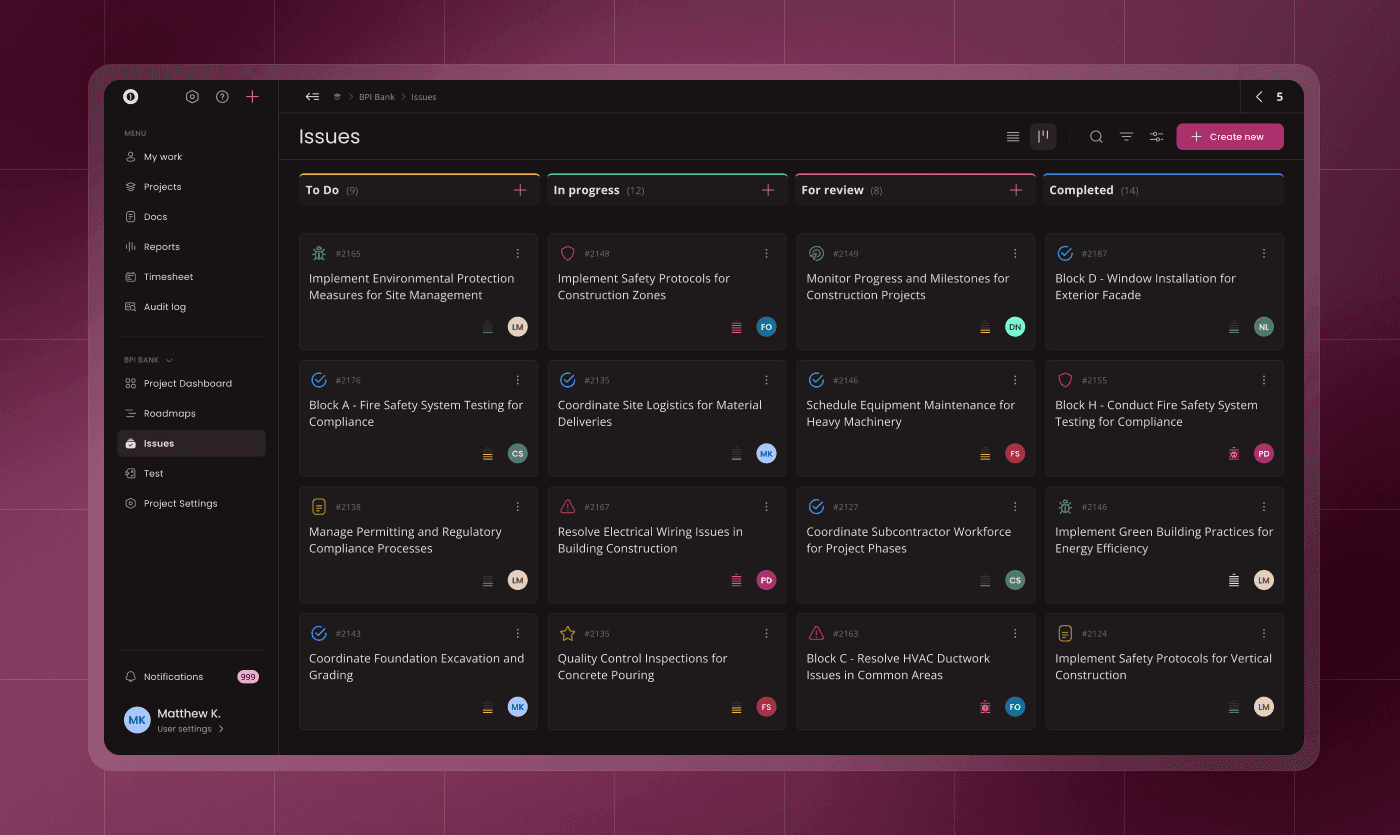
• Added Kanban board for visual workflow management
These changes ensured issues are created correctly and managed efficiently throughout their lifecycle.
3. Advanced Filtering & Personalization
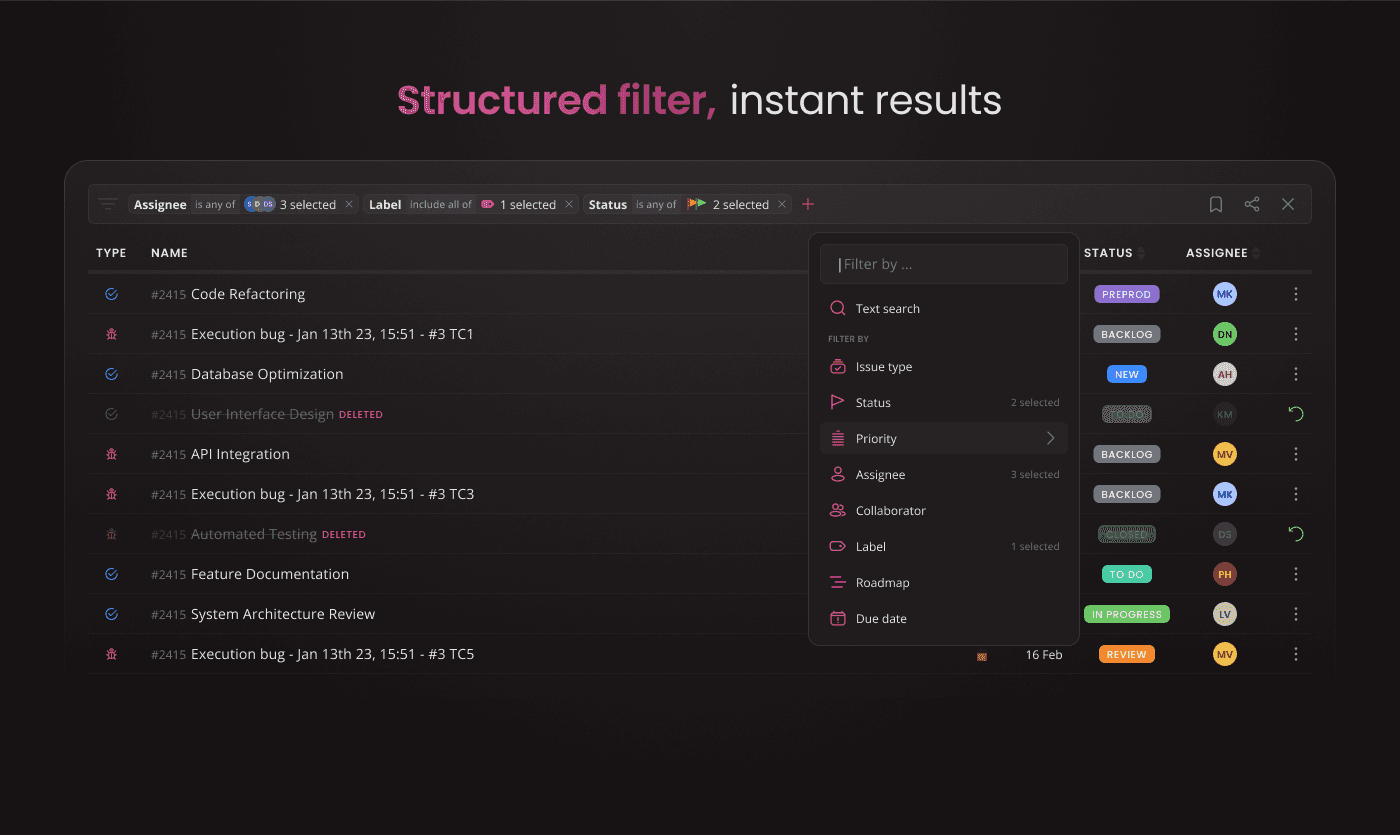
I introduced a completely new filtering system designed for power users and teams.
Users can create complex filters, save them as presets, and access them as custom tabs. This significantly improved navigation and reduced repetitive actions.
Additionally, I designed the “My Work” micro-module — a personal dashboard that surfaces relevant tasks without requiring manual filtering.
Results
The redesigned module significantly improved usability, performance perception, and team collaboration.
The interface became easier to navigate, with faster access to relevant tasks and clearer structure. Users adopted the system more actively, leading to increased engagement and more continuous feedback.
Improved collaboration features, such as functional mentions and notifications, enabled better team communication.
The product also achieved a more professional and scalable feel, aligning with expectations of modern project management tools.
Learnings
Redesigning a core module in a legacy system requires balancing ideal UX solutions with technical constraints.
By focusing on high-impact workflows and introducing flexible, user-driven customization, it was possible to deliver meaningful improvements without overcomplicating implementation.
This project reinforced the importance of designing systems that adapt to different users, not forcing users into rigid workflows.
Redesigning Issue Management for Clarity, Speed & Team Workflows
Overview
The Issue Management module in juno.one is the backbone of the entire platform, connecting tasks, time tracking, documentation, and planning.
The original experience suffered from legacy UI patterns, poor information architecture, and inefficient workflows. As the product grew, these issues significantly impacted usability and team productivity.
I led the end-to-end redesign of the module, focusing on simplifying workflows, improving visibility, and making the system adaptable for different team needs.
Client
juno.one
Timeline
2023
Tools used
Figma
ChatGPT
Miro
Jitter
Illustrator
Problem
The existing module was built on legacy tables with excessive columns, requiring horizontal scrolling and creating high cognitive load.
Filtering and searching issues was slow and required multiple steps, making it difficult for users to find relevant work. Users also didn’t see their assigned tasks by default, forcing repetitive manual filtering.
Creating issues was unintuitive. Users often entered only a title and had to open a separate view to complete details. This resulted in incomplete issues accumulating in the backlog and requiring time-consuming manual cleanup.
From a system perspective, performance was affected by inefficient data handling, further degrading the user experience.
Overall, the module lacked clear structure, intuitive workflows, and scalability.
My role
I was responsible for redesigning the issue management module end-to-end.
My responsibilities included:
• Redefining information architecture and core workflows
• Designing new interaction patterns and UI components using the design system
• Improving filtering, search, and issue creation flows
• Introducing new features to support team workflows and flexibility
• Collaborating with developers within legacy system constraints
The goal was to create a system that is fast, intuitive, and adaptable for different types of users and teams.
Actions
The redesign focused on three key areas.
1. Simplifying Structure & Reducing Cognitive Load
I replaced legacy tables with a structured list-based layout designed for fast scanning and clarity.
The new layout highlights key information while reducing visual noise. Users can also customize visible elements and group issues by properties such as status, assignee, or priority.
This made the interface significantly more readable and adaptable to different workflows.
2. Reworking Core Workflows
I redesigned critical flows to remove friction and improve usability:
• Streamlined issue creation with all key inputs in one flow
• Improved commenting and collaboration with functional mentions and notifications
• Introduced issue linking (parent–child relationships)
• Added Kanban board for visual workflow management
These changes ensured issues are created correctly and managed efficiently throughout their lifecycle.
3. Advanced Filtering & Personalization
I introduced a completely new filtering system designed for power users and teams.
Users can create complex filters, save them as presets, and access them as custom tabs. This significantly improved navigation and reduced repetitive actions.
Additionally, I designed the “My Work” micro-module — a personal dashboard that surfaces relevant tasks without requiring manual filtering.
Results
The redesigned module significantly improved usability, performance perception, and team collaboration.
The interface became easier to navigate, with faster access to relevant tasks and clearer structure. Users adopted the system more actively, leading to increased engagement and more continuous feedback.
Improved collaboration features, such as functional mentions and notifications, enabled better team communication.
The product also achieved a more professional and scalable feel, aligning with expectations of modern project management tools.
Learnings
Redesigning a core module in a legacy system requires balancing ideal UX solutions with technical constraints.
By focusing on high-impact workflows and introducing flexible, user-driven customization, it was possible to deliver meaningful improvements without overcomplicating implementation.
This project reinforced the importance of designing systems that adapt to different users, not forcing users into rigid workflows.