Designing a Yard Management System for Trailer Logistics
Overview
Logistics facilities manage dozens of trailer movements across parking zones, loading docks, and pickup areas every day. Dispatchers need a clear way to plan these movements, while drivers and yard workers must confirm operations quickly on-site.
As part of a client proposal for a logistics operator, I designed the MVP interface for a yard management system that coordinates trailer positioning, dock reservations, and operational tasks across the facility.
The goal was to translate an early functional specification into a clear operational interface supporting dispatchers, drivers, and yard workers. The solution included a desktop platform for planning and monitoring yard activity and a lightweight mobile interface for scanning trailer locations and confirming moves.
The concept was created during a short design phase to help demonstrate the product vision and support discussions before development.
Client
Koala42
Timeline
2025
Tools used
Figma
ChatGPT
NotebookLM
Miro
Problem
Managing trailer operations inside large logistics yards is complex and highly time-sensitive. Dispatchers must coordinate trailer arrivals, parking positions, dock assignments, and pickups while keeping track of dozens of moving assets across the facility.
The provided functional specification described multiple operational tasks — scheduling dock appointments, assigning trailers to parking spots, monitoring yard activity, and confirming movements through QR or RFID scans. However, the workflows were defined mostly at a system level and lacked clear interaction design for the people operating the system.
Several challenges emerged:
Dispatchers needed a clear overview of current and planned yard activity.
Dock scheduling required a time-based interface capable of handling overlapping reservations and operational states.
Drivers and yard workers needed a fast mobile workflow to confirm trailer locations through scanning.
The system needed to communicate multiple operational states such as delays, blocked moves, or completed operations.
The challenge was to translate these operational requirements into a simple interface that supports real-time logistics coordination across desktop and mobile devices.
My role
I worked directly with the product manager to translate the initial specification into a clear MVP product concept.
My responsibilities included:
Creating a basic design system including typography, color tokens, layout grid, and reusable UI components.
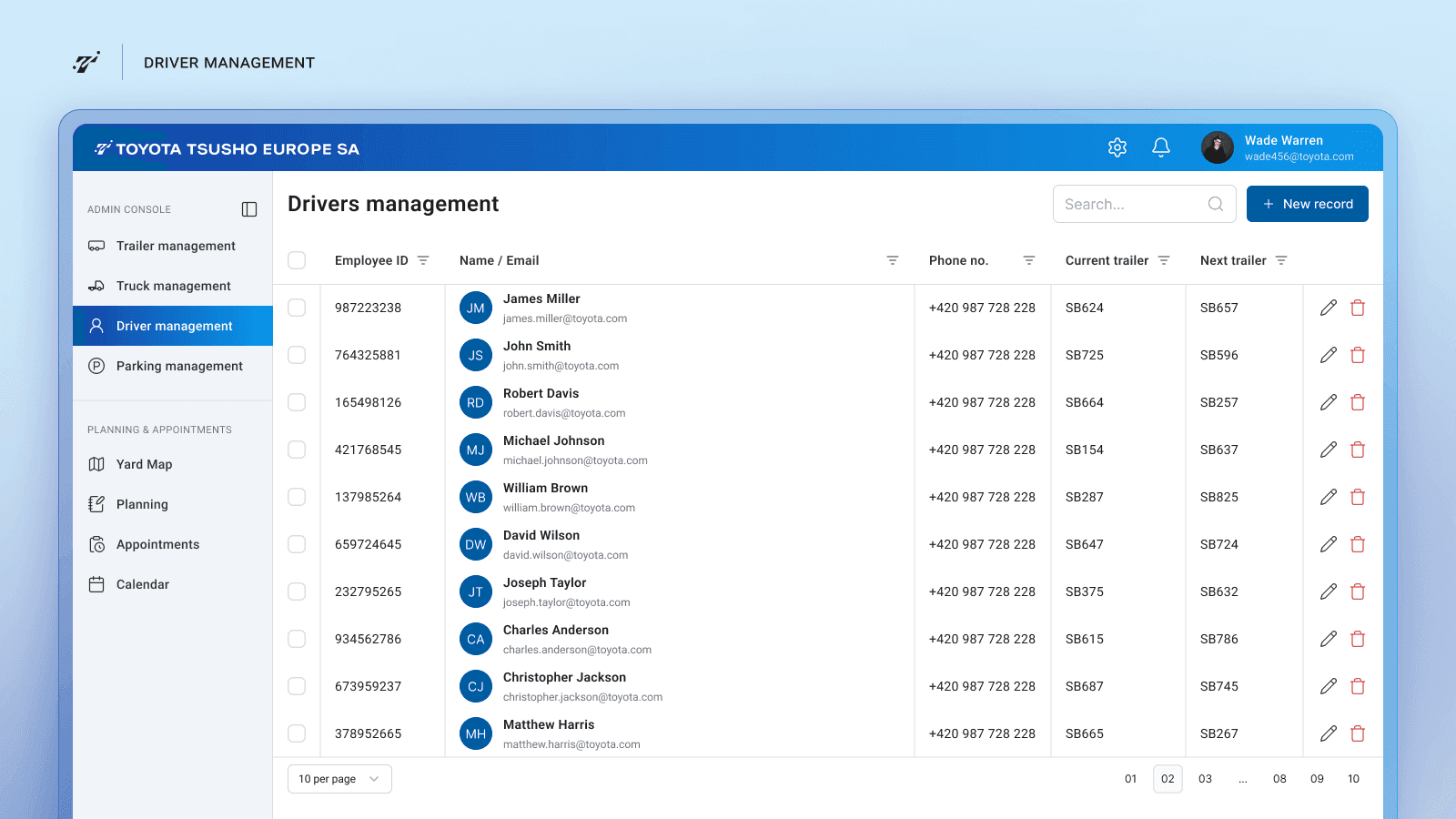
Designing the desktop platform for dispatchers to manage trailer movements and dock schedules.
Designing the dock scheduling calendar and planning tables.
Designing an interactive yard map to visualize trailer positions and future assignments.
Designing the terminal view used by drivers at the gate to find their assigned parking spots.
Designing the mobile scanning app used by drivers and yard workers to confirm trailer movements.
Defining key operational states and edge cases required for basic system behavior.
The goal was to produce a clear, production-ready concept for the MVP interface that could support discussions with the client before development.
Actions
The design work focused on translating the operational specification into a small set of interfaces covering the core workflows of the system.
1. Yard movement planning
Dispatchers coordinate trailer movements between parking areas and loading docks.
To support this, I designed a planning table that lists all scheduled moves, their status, and assigned drivers.
This view allows dispatchers to quickly:
track upcoming trailer movements
monitor delays and blocked operations
contact drivers if schedules change
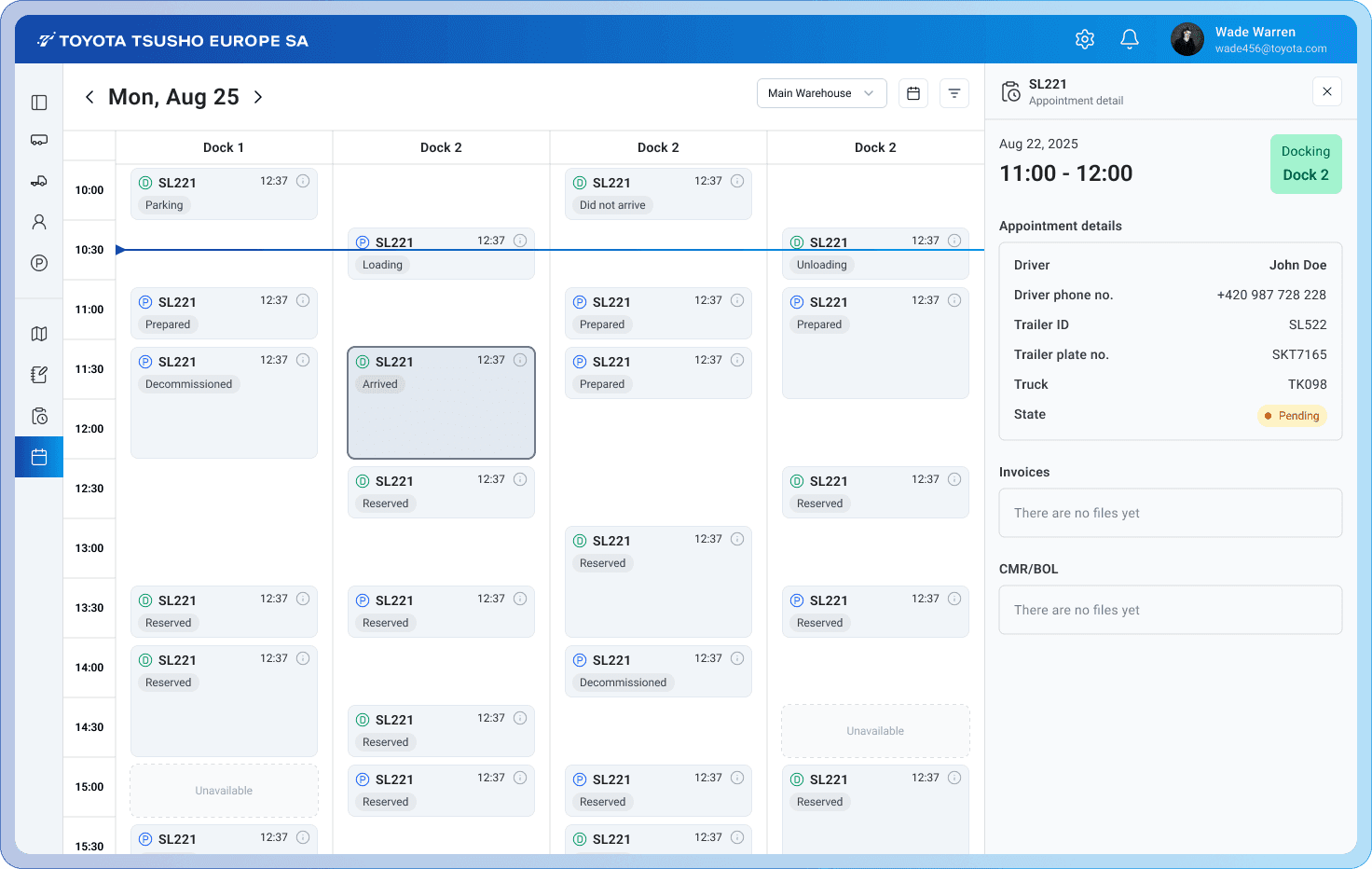
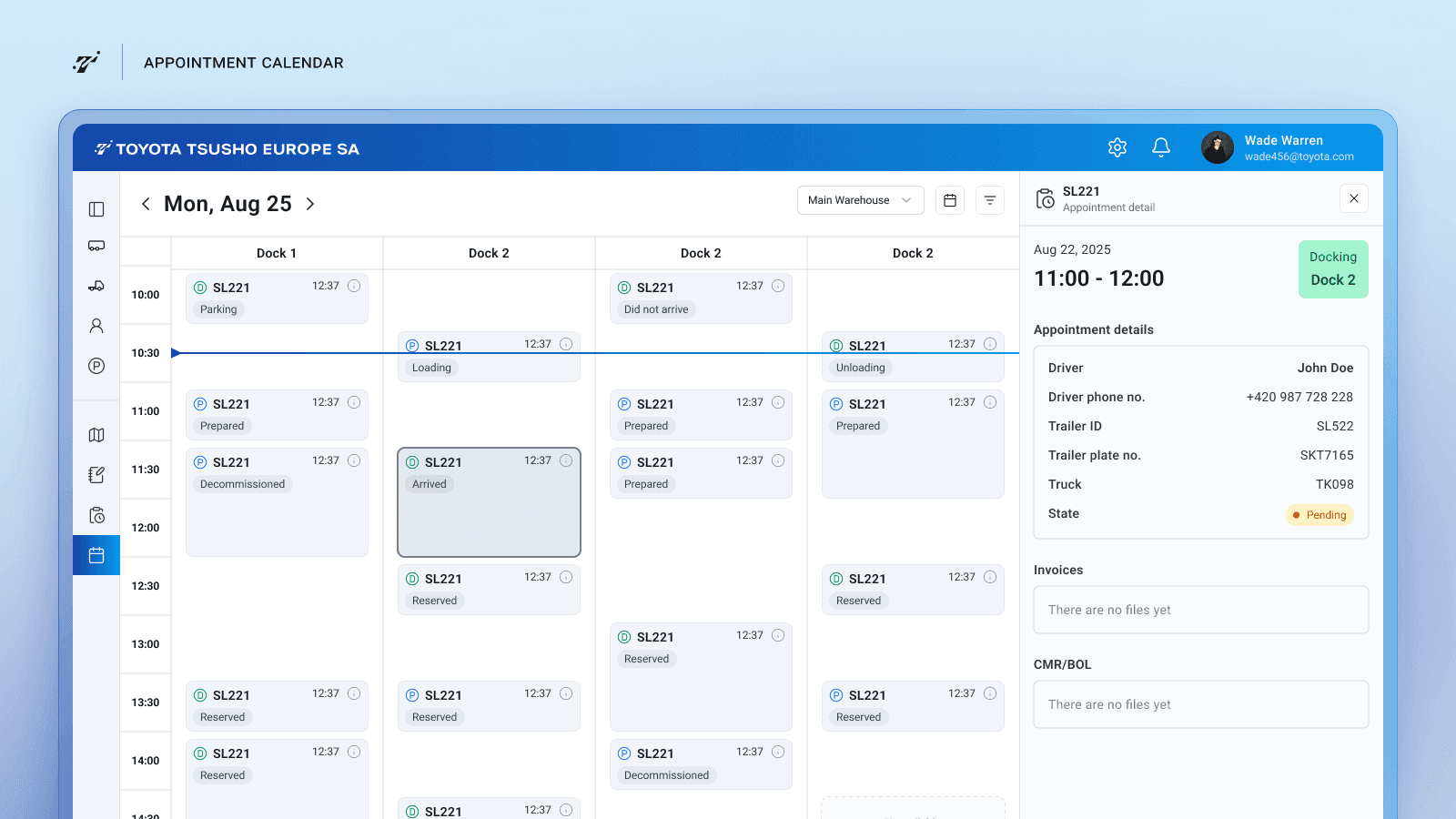
2. Dock scheduling calendar
Dock usage needed to be visualized across time to avoid conflicts and optimize facility capacity.
I designed a calendar-based scheduling interface where each column represents a dock and time slots show upcoming reservations. This allows dispatchers to see available slots, plan incoming trailers, and adjust schedules when delays occur.
The interface highlights operational states such as:
reserved docks
active loading or unloading
delayed arrivals
completed operations
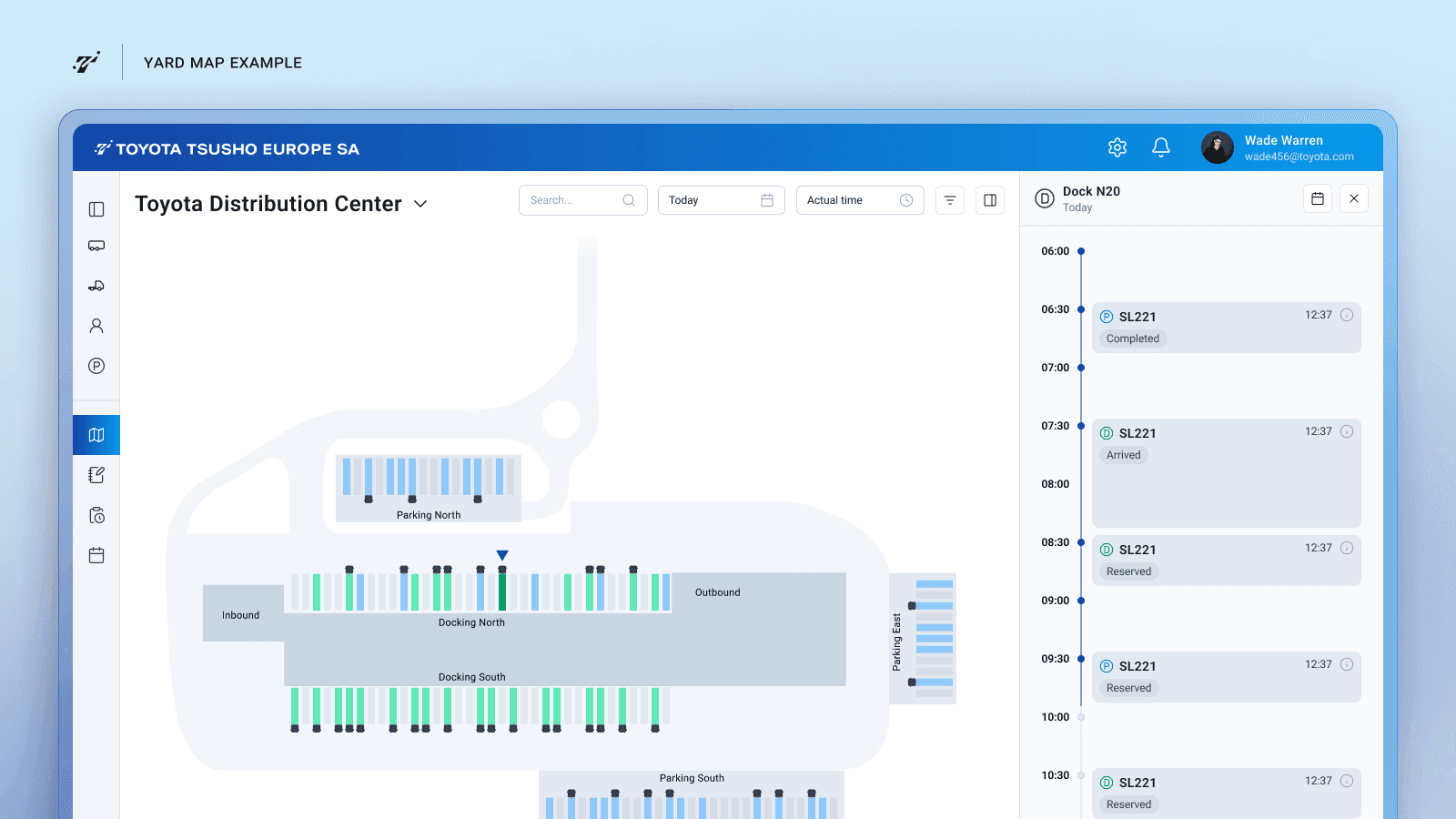
3. Yard map visualization
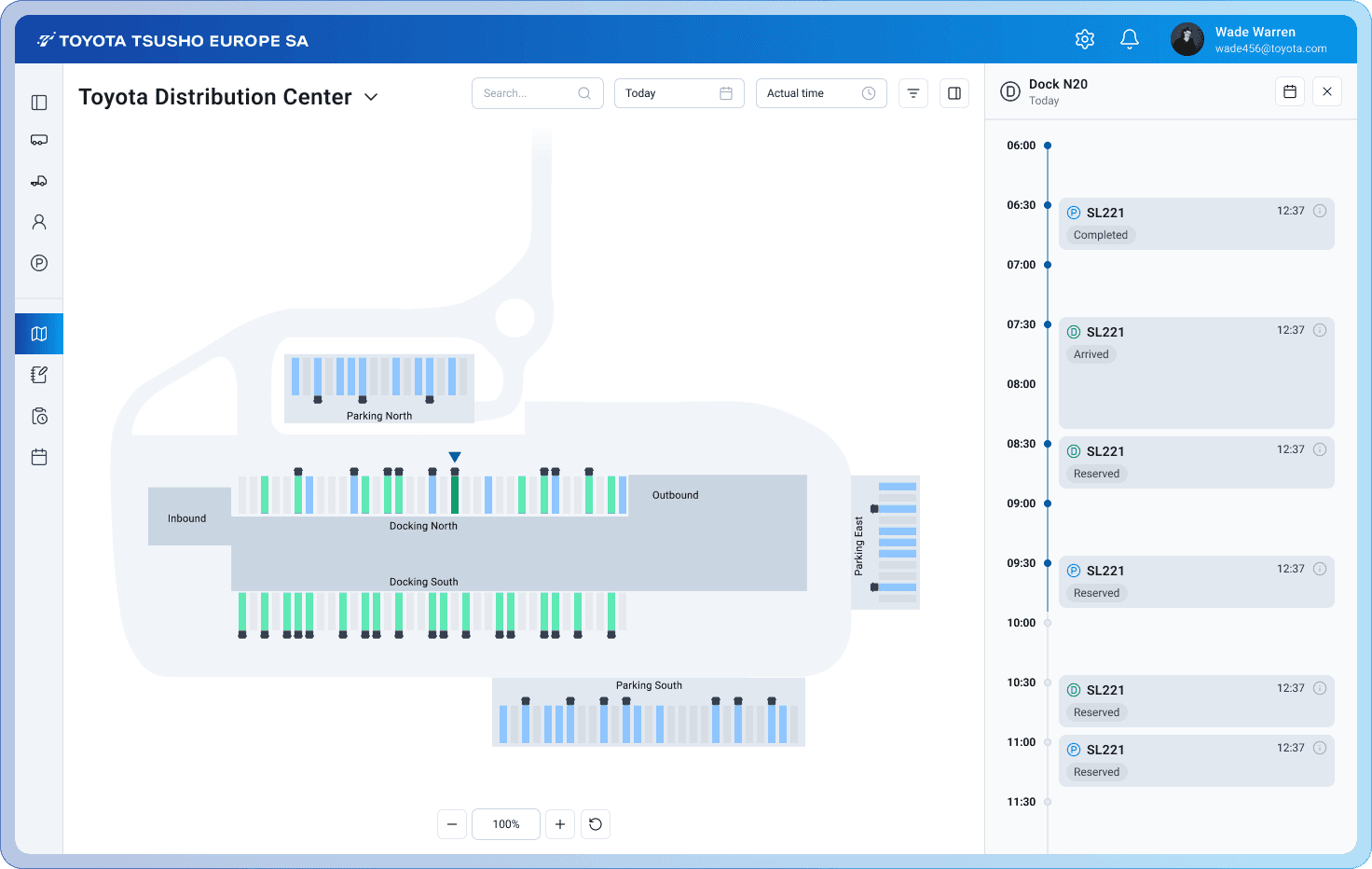
To provide situational awareness, I designed an interactive yard map showing the physical layout of the facility and the real-time positions of trailers.
The map allows dispatchers to:
see where trailers are currently parked
preview planned assignments
identify bottlenecks across docks or parking zones
open detailed information about specific trailers or locations
This visual overview helps translate operational data into a clear spatial understanding of yard activity.
4. Mobile scanning workflow
Drivers and yard workers confirm trailer movements by scanning QR or RFID codes attached to trailers and parking spots.
The mobile interface was designed to support a fast scanning workflow with clear feedback for different situations:
successful trailer placement
incorrect location scanning
scanning a trailer not assigned to the driver
general scanning errors
The goal was to minimize friction and ensure that confirmations can be completed quickly while workers are moving through the yard.
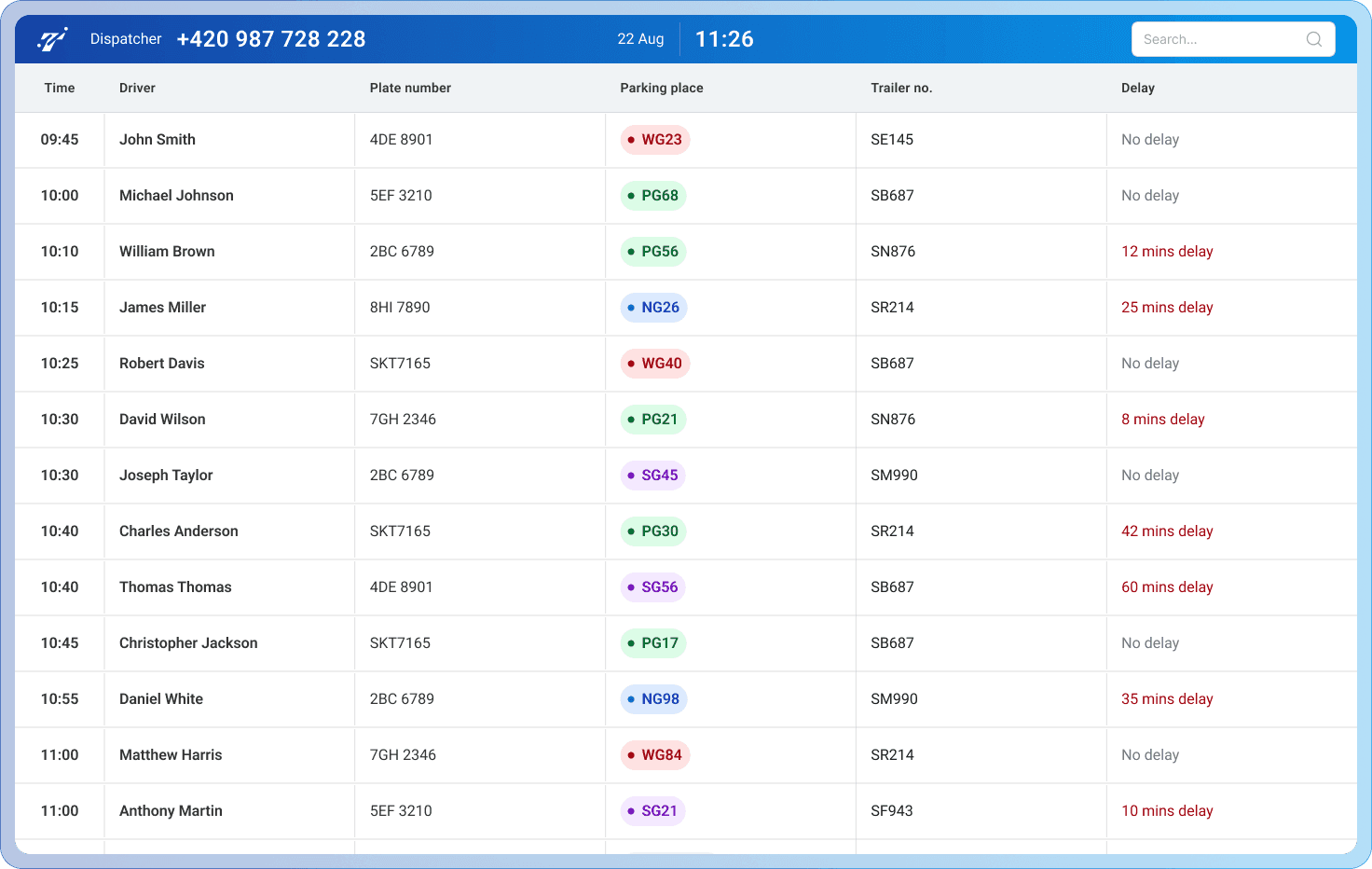
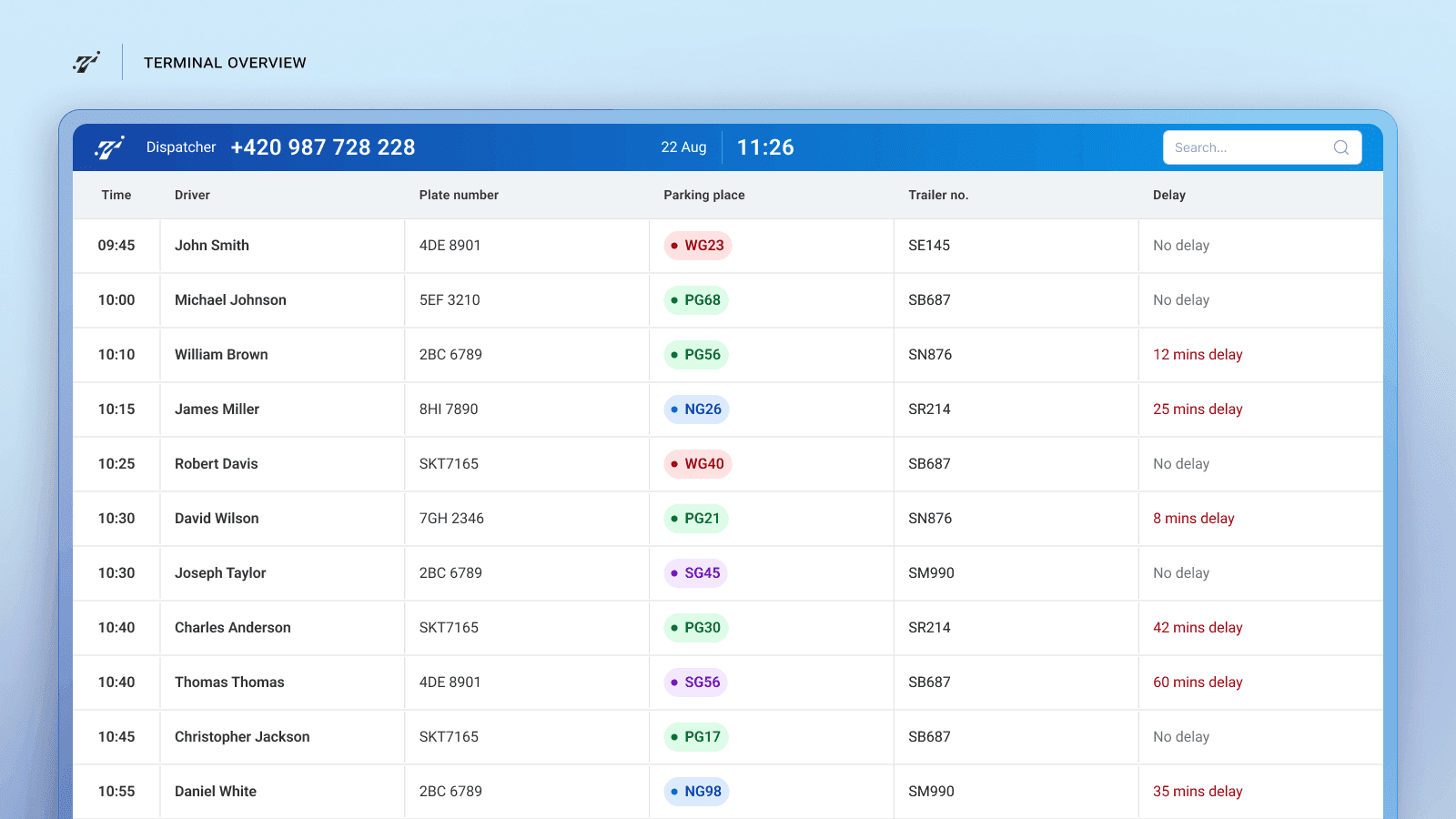
5. Driver terminal view
At the facility gate, drivers need to quickly find where to park their trailer.
I designed a large terminal dashboard displaying upcoming arrivals, assigned parking spots, and delays. This allows drivers to identify their assigned location immediately without needing assistance from staff.
Learnings
Designing operational software for logistics requires translating complex physical processes into interfaces that remain simple under time pressure.
Working on this concept highlighted the importance of:
visualizing spatial operations clearly, especially when many assets move across a physical environment
designing interfaces that support real-time decision making
ensuring that mobile workflows remain extremely fast and error-tolerant
Even in a short design phase, focusing on the key operational workflows helped shape a clear product concept that could communicate the system’s value and guide future development.
Designing a Yard Management System for Trailer Logistics
Overview
Logistics facilities manage dozens of trailer movements across parking zones, loading docks, and pickup areas every day. Dispatchers need a clear way to plan these movements, while drivers and yard workers must confirm operations quickly on-site.
As part of a client proposal for a logistics operator, I designed the MVP interface for a yard management system that coordinates trailer positioning, dock reservations, and operational tasks across the facility.
The goal was to translate an early functional specification into a clear operational interface supporting dispatchers, drivers, and yard workers. The solution included a desktop platform for planning and monitoring yard activity and a lightweight mobile interface for scanning trailer locations and confirming moves.
The concept was created during a short design phase to help demonstrate the product vision and support discussions before development.
Client
Koala42
Timeline
2025
Tools used
Figma
ChatGPT
NotebookLM
Miro
Problem
Managing trailer operations inside large logistics yards is complex and highly time-sensitive. Dispatchers must coordinate trailer arrivals, parking positions, dock assignments, and pickups while keeping track of dozens of moving assets across the facility.
The provided functional specification described multiple operational tasks — scheduling dock appointments, assigning trailers to parking spots, monitoring yard activity, and confirming movements through QR or RFID scans. However, the workflows were defined mostly at a system level and lacked clear interaction design for the people operating the system.
Several challenges emerged:
Dispatchers needed a clear overview of current and planned yard activity.
Dock scheduling required a time-based interface capable of handling overlapping reservations and operational states.
Drivers and yard workers needed a fast mobile workflow to confirm trailer locations through scanning.
The system needed to communicate multiple operational states such as delays, blocked moves, or completed operations.
The challenge was to translate these operational requirements into a simple interface that supports real-time logistics coordination across desktop and mobile devices.
My role
I worked directly with the product manager to translate the initial specification into a clear MVP product concept.
My responsibilities included:
Creating a basic design system including typography, color tokens, layout grid, and reusable UI components.
Designing the desktop platform for dispatchers to manage trailer movements and dock schedules.
Designing the dock scheduling calendar and planning tables.
Designing an interactive yard map to visualize trailer positions and future assignments.
Designing the terminal view used by drivers at the gate to find their assigned parking spots.
Designing the mobile scanning app used by drivers and yard workers to confirm trailer movements.
Defining key operational states and edge cases required for basic system behavior.
The goal was to produce a clear, production-ready concept for the MVP interface that could support discussions with the client before development.
Actions
The design work focused on translating the operational specification into a small set of interfaces covering the core workflows of the system.
1. Yard movement planning
Dispatchers coordinate trailer movements between parking areas and loading docks.
To support this, I designed a planning table that lists all scheduled moves, their status, and assigned drivers.
This view allows dispatchers to quickly:
track upcoming trailer movements
monitor delays and blocked operations
contact drivers if schedules change
2. Dock scheduling calendar
Dock usage needed to be visualized across time to avoid conflicts and optimize facility capacity.
I designed a calendar-based scheduling interface where each column represents a dock and time slots show upcoming reservations. This allows dispatchers to see available slots, plan incoming trailers, and adjust schedules when delays occur.
The interface highlights operational states such as:
reserved docks
active loading or unloading
delayed arrivals
completed operations
3. Yard map visualization
To provide situational awareness, I designed an interactive yard map showing the physical layout of the facility and the real-time positions of trailers.
The map allows dispatchers to:
see where trailers are currently parked
preview planned assignments
identify bottlenecks across docks or parking zones
open detailed information about specific trailers or locations
This visual overview helps translate operational data into a clear spatial understanding of yard activity.
4. Mobile scanning workflow
Drivers and yard workers confirm trailer movements by scanning QR or RFID codes attached to trailers and parking spots.
The mobile interface was designed to support a fast scanning workflow with clear feedback for different situations:
successful trailer placement
incorrect location scanning
scanning a trailer not assigned to the driver
general scanning errors
The goal was to minimize friction and ensure that confirmations can be completed quickly while workers are moving through the yard.
5. Driver terminal view
At the facility gate, drivers need to quickly find where to park their trailer.
I designed a large terminal dashboard displaying upcoming arrivals, assigned parking spots, and delays. This allows drivers to identify their assigned location immediately without needing assistance from staff.
Learnings
Designing operational software for logistics requires translating complex physical processes into interfaces that remain simple under time pressure.
Working on this concept highlighted the importance of:
visualizing spatial operations clearly, especially when many assets move across a physical environment
designing interfaces that support real-time decision making
ensuring that mobile workflows remain extremely fast and error-tolerant
Even in a short design phase, focusing on the key operational workflows helped shape a clear product concept that could communicate the system’s value and guide future development.