Designing a Timesheet Module for Efficient Time Tracking & Planning
Overview
The juno.one platform lacked a native time tracking solution. Teams relied on a third-party tool that was disconnected from tasks and projects, creating inefficiencies across the organization.
I designed and delivered a new timesheet module end-to-end, enabling users to log time directly within the product, link it to tasks and projects, and support planning, approvals, and reporting.
The goal was to simplify time tracking while making it usable for individual contributors, project managers, and accounting teams.
Client
juno.one
Timeline
2023
Tools used
Figma
Miro
Illustrator
Problem
The existing time tracking workflow relied on an external tool that was not integrated with the product.
Users could not link time entries to specific tasks or projects, making tracking and reporting inefficient. Employees working across multiple projects had no clear way to allocate or plan their time.
From an operational perspective, accounting teams had to manually export and process time data at the end of each month, often spending days consolidating information.
The tool also lacked approvals, offered poor visibility of logged time, and required too many steps to record entries.
The challenge was to design a system that would connect time tracking with actual work, reduce friction, and support team-level workflows.
My role
I was responsible for designing and delivering the timesheet module end-to-end.
My responsibilities included:
• Defining user flows for time logging, planning, and approvals
• Designing all key views and interaction patterns
• Ensuring consistency with the existing product and design system
• Collaborating closely with developers under tight capacity constraints
• Adapting UX decisions to fit limitations of the legacy system and backend
The goal was to create a solution that was simple for daily use but robust enough for team operations and reporting.
Actions
The solution focused on three key areas.
1. Connected Time Tracking
I designed a system where users can log time directly against tasks and projects.
This eliminated the disconnect between work and time tracking, making entries more accurate and easier to manage across multiple projects.
2. Flexible Time Logging & Overview
To reduce friction and improve visibility, I introduced multiple ways to work with time data:
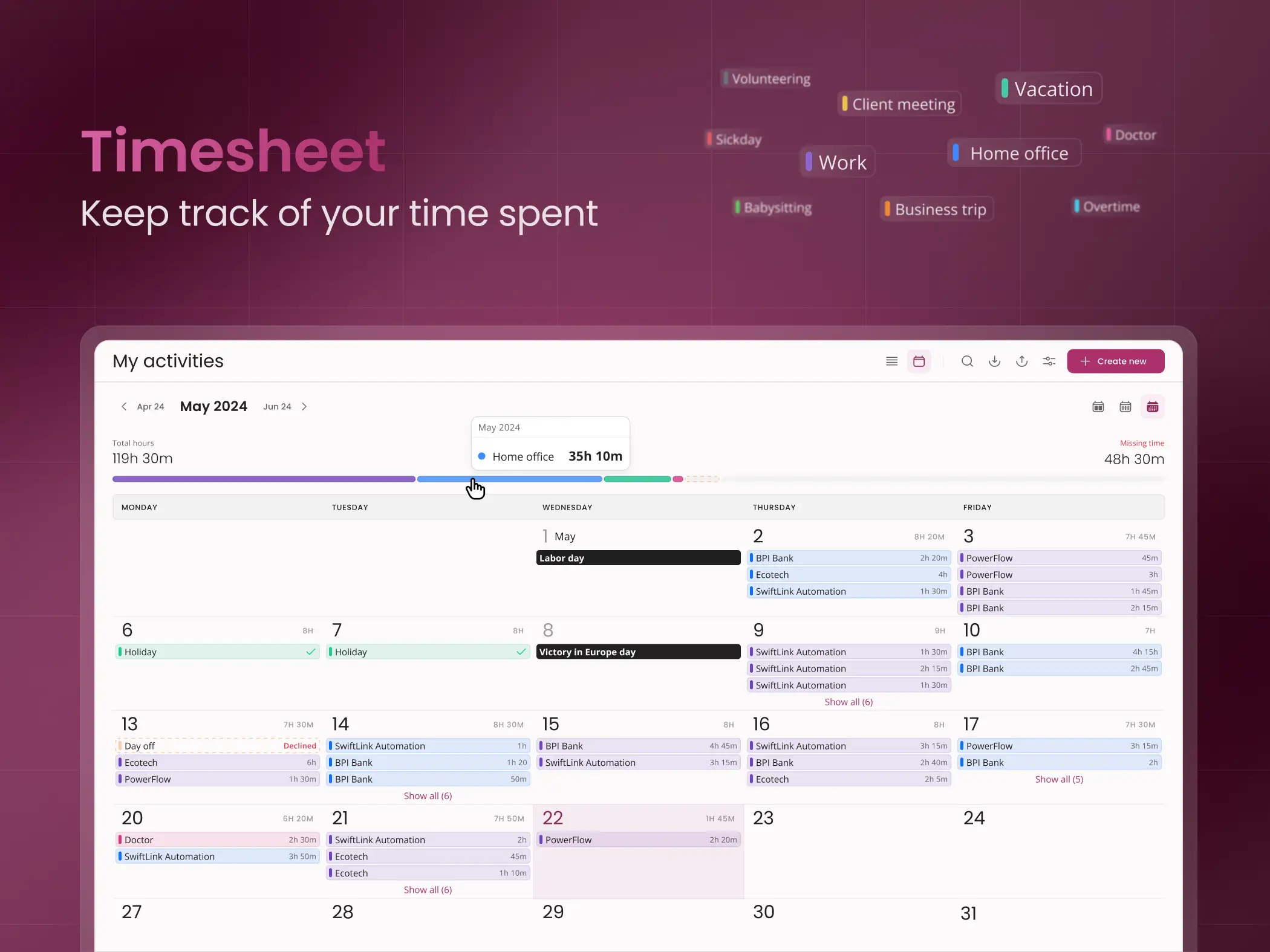
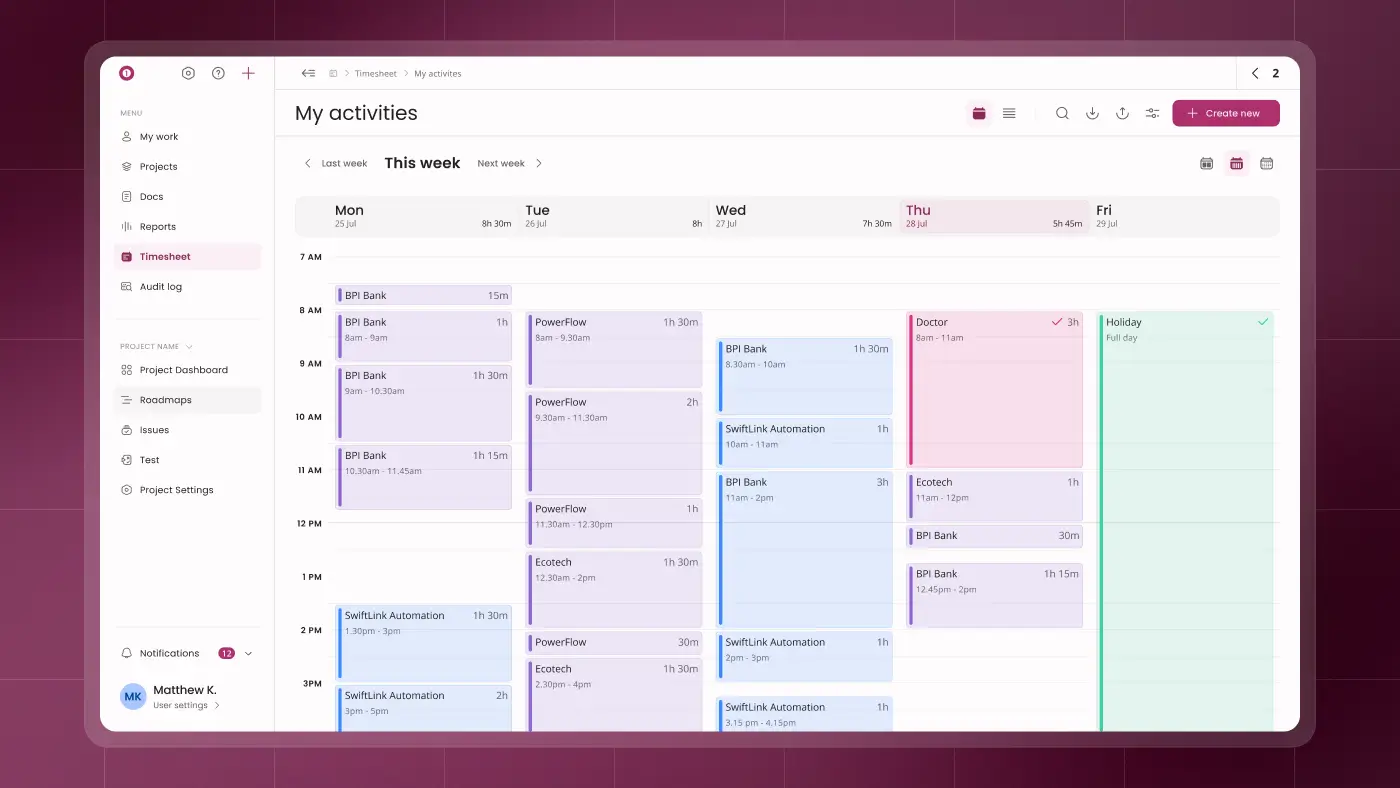
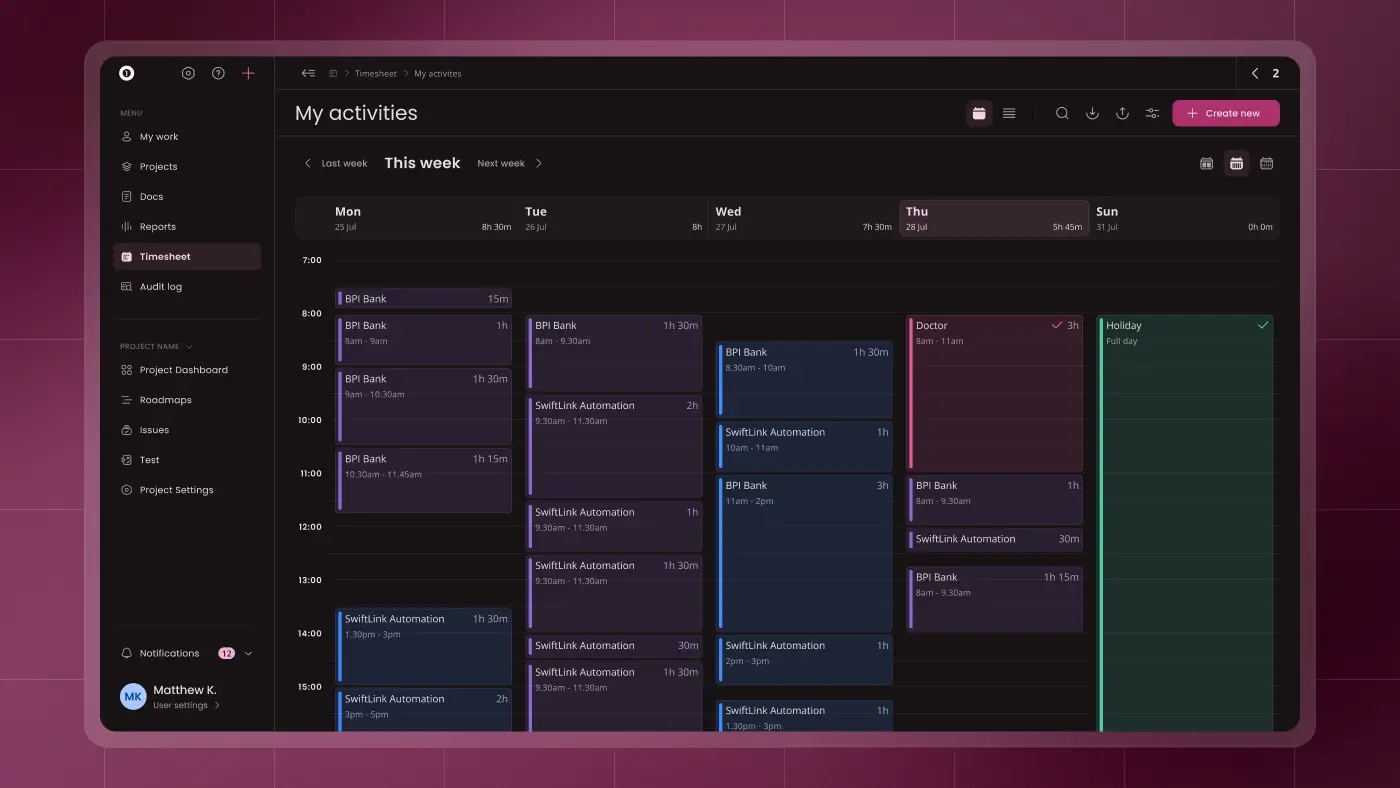
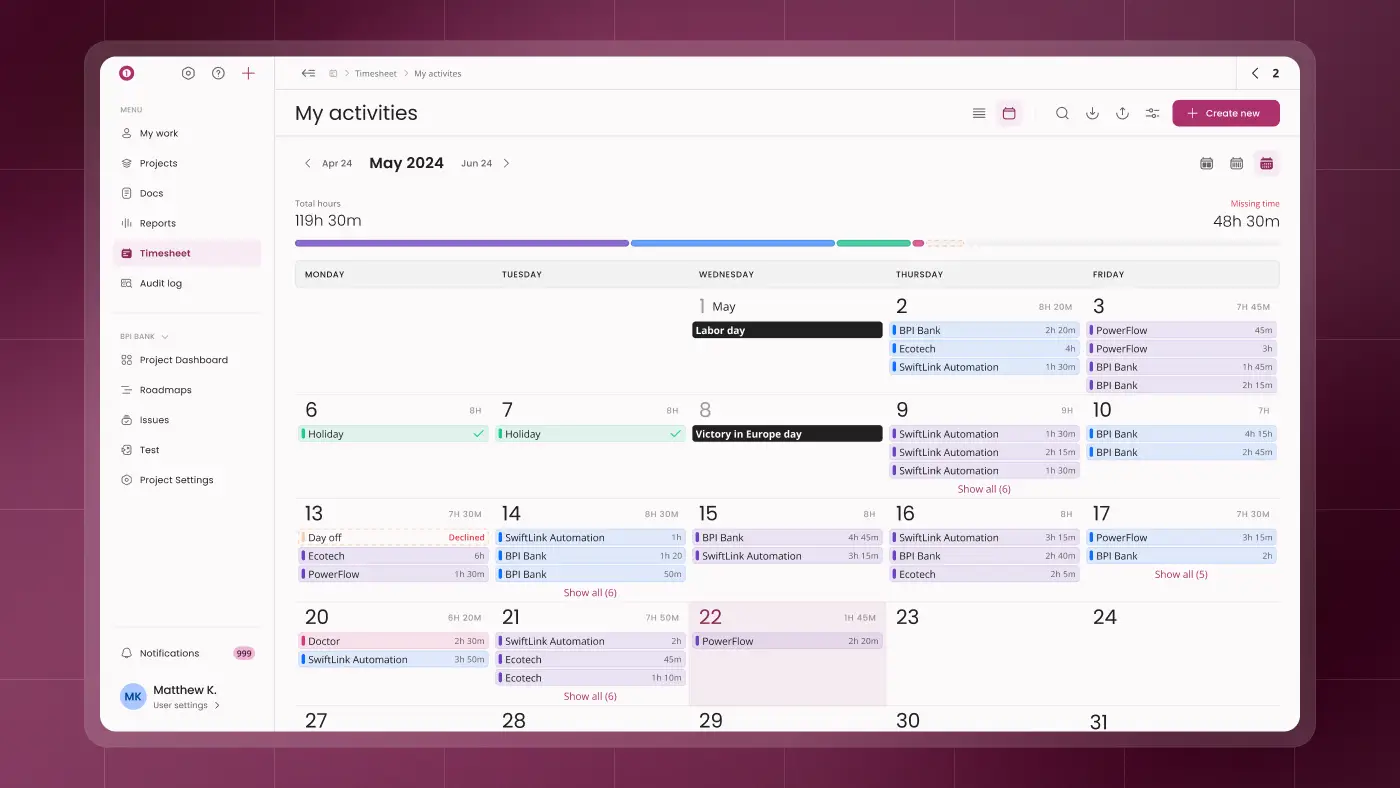
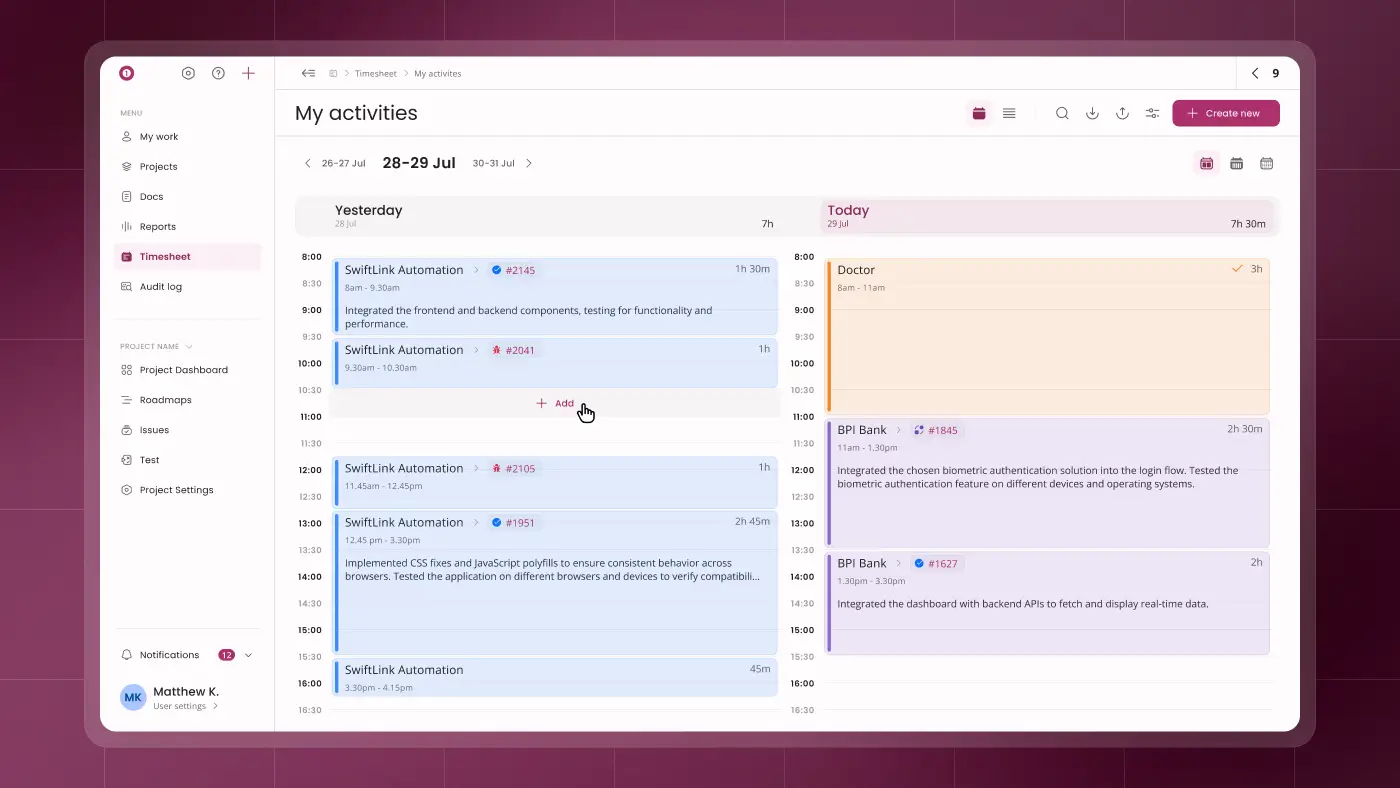
• Calendar view (month, week, 2-day) for quick entry and overview
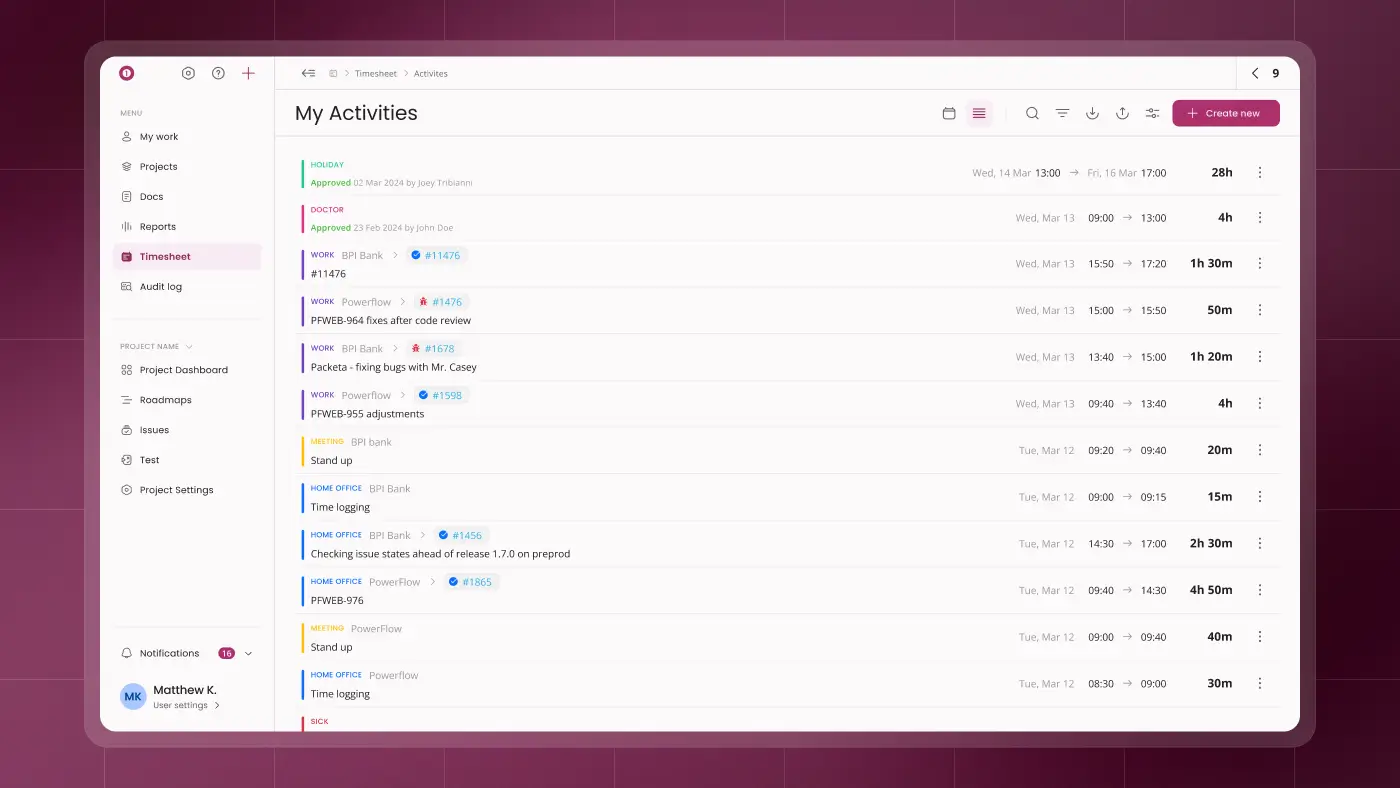
• Table view showing time logged per task and day
• Inline editing for fast adjustments
This allowed users to choose the most efficient way to log and review their work.
3. Planning & Approval Workflow
The module introduced support for time allocation and approvals, enabling better team coordination.
Users could plan time across projects, while managers gained visibility and control through structured approval flows.
This addressed key gaps from the previous solution and aligned time tracking with real team workflows.
Results
The new module significantly improved both daily usability and operational efficiency.
Time logging became faster and more intuitive, reducing friction for individual users. Teams gained better visibility of work distribution, making planning more effective.
Accounting processes were simplified, saving substantial time previously spent on manual data processing.
Improved backend structure also reduced post-release issues, while stakeholders reported strong satisfaction with the new solution.
Learnings
Designing a complex module within a legacy system and limited development capacity required careful prioritization.
By focusing on core workflows and flexible interaction patterns, it was possible to deliver a solution that balanced usability with technical constraints.
This project reinforced the importance of connecting product features with real operational workflows, not just interface improvements.
Designing a Timesheet Module for Efficient Time Tracking & Planning
Overview
The juno.one platform lacked a native time tracking solution. Teams relied on a third-party tool that was disconnected from tasks and projects, creating inefficiencies across the organization.
I designed and delivered a new timesheet module end-to-end, enabling users to log time directly within the product, link it to tasks and projects, and support planning, approvals, and reporting.
The goal was to simplify time tracking while making it usable for individual contributors, project managers, and accounting teams.
Client
juno.one
Timeline
2023
Tools used
Figma
Miro
Illustrator
Problem
The existing time tracking workflow relied on an external tool that was not integrated with the product.
Users could not link time entries to specific tasks or projects, making tracking and reporting inefficient. Employees working across multiple projects had no clear way to allocate or plan their time.
From an operational perspective, accounting teams had to manually export and process time data at the end of each month, often spending days consolidating information.
The tool also lacked approvals, offered poor visibility of logged time, and required too many steps to record entries.
The challenge was to design a system that would connect time tracking with actual work, reduce friction, and support team-level workflows.
My role
I was responsible for designing and delivering the timesheet module end-to-end.
My responsibilities included:
• Defining user flows for time logging, planning, and approvals
• Designing all key views and interaction patterns
• Ensuring consistency with the existing product and design system
• Collaborating closely with developers under tight capacity constraints
• Adapting UX decisions to fit limitations of the legacy system and backend
The goal was to create a solution that was simple for daily use but robust enough for team operations and reporting.
Actions
The solution focused on three key areas.
1. Connected Time Tracking
I designed a system where users can log time directly against tasks and projects.
This eliminated the disconnect between work and time tracking, making entries more accurate and easier to manage across multiple projects.
2. Flexible Time Logging & Overview
To reduce friction and improve visibility, I introduced multiple ways to work with time data:
• Calendar view (month, week, 2-day) for quick entry and overview
• Table view showing time logged per task and day
• Inline editing for fast adjustments
This allowed users to choose the most efficient way to log and review their work.
3. Planning & Approval Workflow
The module introduced support for time allocation and approvals, enabling better team coordination.
Users could plan time across projects, while managers gained visibility and control through structured approval flows.
This addressed key gaps from the previous solution and aligned time tracking with real team workflows.
Results
The new module significantly improved both daily usability and operational efficiency.
Time logging became faster and more intuitive, reducing friction for individual users. Teams gained better visibility of work distribution, making planning more effective.
Accounting processes were simplified, saving substantial time previously spent on manual data processing.
Improved backend structure also reduced post-release issues, while stakeholders reported strong satisfaction with the new solution.
Learnings
Designing a complex module within a legacy system and limited development capacity required careful prioritization.
By focusing on core workflows and flexible interaction patterns, it was possible to deliver a solution that balanced usability with technical constraints.
This project reinforced the importance of connecting product features with real operational workflows, not just interface improvements.